
» Inline Ad Purchase: Intext Link | Banner Ad
Your analytics tell an interesting story.
Visitors from Mexico, Germany, France — they’re finding your products. They’re adding to cart. And somewhere between “Add to Cart” and “Place Order,” they vanish.
The culprit? Your checkout page is English-only.
That billing form asking for “First Name” and “Street Address”? A Spanish speaker sees unfamiliar words and an untrustworthy vibe. They bounce. You lose the sale.
This isn’t a small problem. For stores with international traffic, checkout abandonment from non-English speakers can run 40% higher than native speakers.
Let’s fix it.
Why Most WooCommerce Translation Solutions Are Overkill
The standard advice is “install WPML” or “use Polylang.” These are powerful plugins. They’re also built to translate your entire WordPress site — every page, post, menu, and widget.
That’s a sledgehammer when you need a scalpel.
Here’s what typically happens:
- 2-3 hours of setup and configuration
- $79-199/year in subscription fees
- Slower page loads from translation overhead
- Ongoing maintenance when themes or plugins update
- Duplicate content issues if not configured perfectly
Meanwhile, your actual problem is simple: you need “First Name” to display as “Nombre” when a Spanish speaker checks out.
What International Customers Actually Need at Checkout
Forget translating your blog posts or About page. When someone’s ready to hand over their credit card, they need exactly three things in their language:
1. Field labels they recognize “Nombre” not “First Name.” “Dirección” not “Address.” Basic stuff, but it builds instant trust.
2. Placeholder text that guides them That grey helper text inside input fields? It tells customers what format you expect. “nombre@ejemplo.com” makes more sense than “you@example.com” to a Spanish speaker.
3. Error messages they understand Nothing kills a sale faster than a red error message in a foreign language. If their email is invalid, tell them in words they comprehend.
Get these three things right and your international checkout experience transforms completely.
A Focused Solution for WooCommerce Checkout Translation
TranslateCart does one thing: translates your WooCommerce checkout fields. Nothing more, nothing less.
No bloat. No complex configuration. No annual subscription for the core features.
Here’s how it works in practice:
- A customer from Spain visits your store (browser language: Spanish)
- They browse products in English — that’s normal, they expect it
- They reach checkout and see everything in Spanish
- Trust established. Purchase completed.
Setup takes 15 minutes. Most of that is typing translations into a simple table.
Every Checkout Element You Can Translate
TranslateCart covers the complete WooCommerce checkout:
Billing & Shipping Fields
- First Name, Last Name, Company
- Country, Address, City, State, Postcode
- Phone, Email
Form Elements
- Field labels (the text above inputs)
- Placeholder text (the grey text inside inputs)
- Field descriptions (helper text below inputs)
- Required field indicators
Feedback & Navigation
- Validation error messages
- Section headings (Billing Details, Shipping Address, etc.)
- Button text
Both WooCommerce Classic Checkout and Block Checkout are fully supported.
25 Languages Ready to Go
Built-in support for:
European: Spanish, French, German, Italian, Portuguese, Dutch, Polish, Swedish, Norwegian, Danish, Finnish, Czech, Greek, Russian
Asian: Chinese, Japanese, Korean, Hindi, Thai, Vietnamese, Indonesian
Middle Eastern: Arabic, Hebrew, Turkish
RTL (right-to-left) languages display correctly. No extra configuration needed.
Automatic Language Detection
TranslateCart reads your customer’s browser language setting automatically. A visitor with their browser set to German sees German checkout fields. No clicking, no selecting.
Want to give customers manual control? Add a language selector widget. Works as a shortcode, widget, or automatic display above checkout fields.
Free vs Pro: What’s the Difference?
The free plugin handles everything above. It’s fully functional, not a crippled trial.
TranslateCart Pro ($99/year) adds three things:
Custom Checkout Fields Need a delivery date picker? Gift message box? VAT number field for EU compliance? Build them directly in the plugin with 10 field types — text, dropdown, checkbox, date picker, and more.
Conditional Logic Show fields based on cart contents. Display a gift message option only when gift wrap is in the cart. Ask for company VAT number only on orders over €500.
Email Translation Order confirmations, shipping notifications, all WooCommerce transactional emails — sent in the customer’s checkout language.
Most stores do fine with free. Pro is for stores with specific compliance needs or custom checkout requirements.
15-Minute Setup Guide
Step 1: Install Search “TranslateCart” in WordPress plugins or download from WordPress.org.
Step 2: Add Languages Go to WooCommerce → TranslateCart → Languages. Add the languages matching your international traffic (check Google Analytics → Geo data).
Step 3: Enter Translations Navigate to Field Translations. You’ll see a table: English on the left, your target languages on the right. Fill in translations for each field.
Step 4: Configure Language Selector Optional. If you want customers to switch languages manually, enable the selector and choose your display style.
Step 5: Test Use the built-in Checkout Preview or change your browser language to verify everything displays correctly.
Using checkout fields from other plugins? Click “Detect Custom Fields” to find and translate those too.
The ROI Question
Will this increase sales? Consider the psychology:
A customer is about to enter payment details on a foreign website. The form shows unfamiliar labels. An error message appears in a language they don’t speak.
How confident do they feel completing that purchase?
Now imagine the same checkout with every element in their native language. They know exactly what’s being asked. Error messages actually help them fix problems.
Same store. Same products. Dramatically different experience.
I can’t promise specific conversion lifts — every store is different. But removing language friction at the exact moment someone decides to buy? That’s straightforward ROI.
Get Started
Free version: Download from WordPress.org
Pro version: TranslateCart Pro — $99/year, 14-day money-back guarantee
Takes 15 minutes to set up. Check your international conversion rates in a few weeks and see the difference.
Questions? Leave a comment or post in the plugin support forum.
» Inline Ad Purchase: Intext Link | Banner Ad
After months of refining, testing, and listening to user feedback, OIO Publisher v3.5 is here.
This release takes everything that made OIO Publisher reliable and brings it up to a modern standard — faster workflows, a clean new layout, and for the first time, built-in banner generation so you can create ad visuals right from your dashboard.
A Modern Interface That Just Feels Better
If you’ve used older versions of OIO Publisher, you’ll notice the difference immediately.
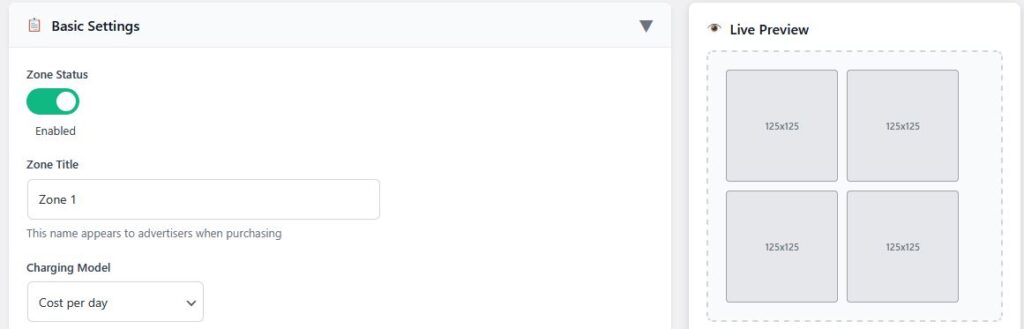
The Banner Ad and Text Ad zone pages have been completely rebuilt with a new two-column layout. Settings are now grouped into clear sections like Basic Settings, Pricing & Budget, Layout & Display, and Advanced Settings. Each section can be collapsed, and your preferences stay remembered the next time you return.
We’ve added a live preview panel so you can see your ad layout update in real time as you make changes — no more saving and refreshing repeatedly. Everything responds faster and feels smoother across desktop and mobile.
Pricing, Layout, and Shortcodes Made Simple
Configuring ad pricing used to take extra effort. Now, it’s straightforward.
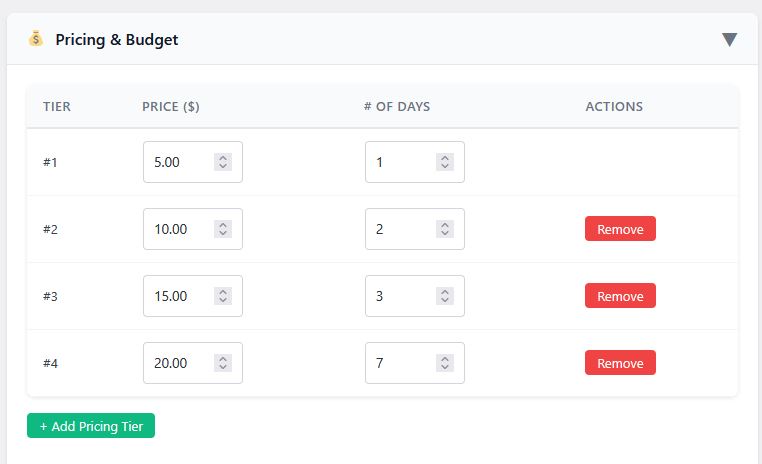
Instead of text boxes, there’s a visual pricing table where you can easily add or remove tiers with a click. It’s cleaner, faster, and makes it much harder to make mistakes.
We also added one-click shortcode copying — a small touch, but one that saves time if you embed ads often.
Built-In Banner Generation
Version 3.5 introduces a brand-new banner generation feature that lets you instantly create professional ad banners without leaving OIO.
Whether you need a quick header image or a full promotional graphic, you can produce vivid, high-definition results in seconds. It’s perfect for publishers and advertisers who don’t have a designer on hand but still want polished visuals.
Faster, More Consistent, and Mobile-Ready
The entire admin interface is now fully responsive and up to four times faster when saving or editing zones. We’ve introduced toggle switches, hover effects, and a consistent design language throughout the plugin to make navigation feel natural and cohesive.
Under the hood, we also fixed a few long-standing issues with pricing arrays, value filtering, and banner creation validation — ensuring smoother performance and more reliable saving.
Why This Update Matters
This update isn’t just about looks. It’s about giving OIO users a more enjoyable, efficient experience — whether you’re setting up your first ad zone or managing multiple campaigns.
OIO Publisher 3.5 continues to move forward with the same philosophy it started with: control, ownership, and simplicity for site owners who want to manage their own ad space without middlemen.
Try It Today
If you’re already using OIO Publisher, be sure to back up your files before updating.
You can download v3.5 from your account page.
If you haven’t tried OIO yet, now’s a great time — it’s faster, cleaner, and more capable than ever.
» Inline Ad Purchase: Intext Link | Banner Ad
I’ve been building WordPress solutions for years, and I kept hearing the same frustrating story from clients: “Our shipping costs are killing us because of bad addresses.”
One client was spending nearly $2,000 a month on reshipping fees alone. Customers would enter incomplete addresses, forget apartment numbers, or make typos that caused packages to get returned. Every failed delivery meant paying shipping costs twice, plus dealing with frustrated customers.
That’s when I realized there had to be a better way.
The Problem Every Online Business Faces
After talking to dozens of business owners, I discovered that address problems are way more common than most people realize. Nearly 25% of online address entries have some kind of error that can cause delivery issues.
The worst part? Most business owners don’t even know how much this is costing them. They see failed deliveries as “just part of doing business” instead of a solvable problem.
Here’s what I learned these mistakes typically look like:
- Customers abbreviate street names incorrectly
- Apartment and unit numbers get forgotten or put in the wrong fields
- ZIP codes don’t match the entered city and state
- People make up addresses that sound right but don’t actually exist
Each of these seemingly small mistakes can turn into expensive shipping problems that hurt both your bottom line and customer relationships.
Why Standard Forms Don’t Solve This
Gravity Forms is fantastic for building forms, but the default address fields are basically just text boxes. They’ll accept whatever someone types without any verification or helpful suggestions.
I watched clients struggle with this limitation daily. Their forms looked professional, but underneath they were collecting bad data that would cause problems later. There was no way to catch mistakes before they happened.
That’s when I decided to build a solution that would bring enterprise-level address validation to any WordPress site using Gravity Forms.
How I Built the Solution
The key was integrating with the USPS database – the same system that mail carriers use every day. If an address exists and can receive mail, it’s in there. If it’s not in the USPS database, packages probably aren’t going to make it there anyway.
I partnered with Smarty, which provides clean API access to USPS data, and built an extension that works seamlessly with existing Gravity Forms. The goal was simple: make it feel like magic to users while preventing expensive mistakes for business owners.
Here’s how it works:
- Customer starts typing their address
- Real-time suggestions appear from verified USPS data
- System automatically fills in correct ZIP+4 codes
- Catches missing apartment numbers for multi-unit buildings
- Ensures the final address is standardized and deliverable
Real Results From Real Businesses
Since launching this extension, I’ve seen some incredible results from clients:
One e-commerce store reduced their failed delivery rate from 15% to under 3% in the first month. That saved them over $1,200 in reshipping costs immediately.
A service business owner told me they went from making 2-3 “can you confirm your address?” phone calls per day to maybe one per week. The time savings alone was worth it for their team.
But my favorite feedback came from a customer who said their checkout process felt “more professional and trustworthy” with the address validation. Sometimes it’s the little touches that make the biggest difference in how customers perceive your business.
Why I Made Setup Dead Simple
I’ve seen too many powerful tools go unused because they’re too complicated to implement. So I designed this extension to work with zero configuration.
Install it, add your free Smarty API key, and it automatically enhances every Gravity Forms address field on your site. No rebuilding forms, no complex settings, no technical headaches.
The whole setup takes about 5 minutes, and most of that is just creating your free Smarty account.
Pricing That Makes Sense
I could have built this as a monthly subscription service, but that didn’t feel right. Address validation shouldn’t be another recurring expense eating into your profits every month.
Instead, I made it a one-time purchase at $60. Use it on unlimited sites, get lifetime updates, and you’re done. For most businesses, this pays for itself in prevented shipping costs within the first week or two.
The free Smarty tier includes 1,000 address lookups per month, which covers most small to medium websites. Only businesses processing thousands of addresses monthly need to upgrade to a paid Smarty plan.
What’s Next
Right now the extension focuses on US addresses since that covers the vast majority of WordPress sites. But I’m working on international support for version 2.0 based on customer requests.
I’m also exploring additional features like duplicate address detection and integration with shipping calculators. If you have ideas for improvements, I’d love to hear them.
Should Your Business Use This?
If you’re collecting addresses for any reason – shipping products, scheduling services, building mailing lists – and you’re losing money or time to address problems, this extension can help.
The math is straightforward: if bad addresses cost your business more than $60 in failed deliveries, customer service time, or lost sales, then this solution pays for itself quickly.
Even if you’re not having major delivery problems yet, the professional experience creates trust with customers. In a competitive market, that kind of attention to detail can make the difference between someone choosing your business or going elsewhere.
Get Started Today
I built this extension because I was tired of watching good businesses lose money to a completely solvable problem. Address validation shouldn’t be complicated or expensive – it should just work.
You can grab the extension here and have it running on your site in minutes. With the 30-day money-back guarantee, there’s really no risk in trying it.
Your shipping costs will thank you, your customers will have a better experience, and you’ll wonder why you didn’t fix this problem sooner.
Questions?
I’m always happy to help potential customers figure out if this solution is right for their specific situation. Feel free to reach out if you want to discuss your address validation needs or have questions about how the extension works.
After all, I built this to solve real problems for real businesses. If it can help yours run more smoothly and profitably, that’s exactly what I was hoping for.
» Inline Ad Purchase: Intext Link | Banner Ad
[gravityform id=”2″ title=”true”]
» Inline Ad Purchase: Intext Link | Banner Ad
In the world of online advertising, tools come and go, but some stand the test of time by evolving and improving. OIO Publisher is one such tool. Despite rumors of its discontinuation, I’m excited to share that OIO Publisher is very much alive, under new ownership, and packed with new features to help you maximize your ad revenue.
A New Chapter for OIO Publisher
OIO Publisher has recently come under new ownership, breathing fresh life into this already powerful ad management tool. The new team is dedicated to ensuring that OIO Publisher remains a top choice for website owners looking to manage and monetize their ad space efficiently.
New Features to Boost Your Ad Management
With the change in ownership comes a host of new features designed to make your life easier and your ad management more effective. Here are some of the standout additions:
Stripe Integration
One of the most exciting new features is the integration with Stripe. This allows for seamless payment processing, ensuring that your ad revenue flows smoothly and securely. Stripe’s reputation for reliability and security makes it a perfect fit for OIO Publisher.
Mailchimp Integration
Email marketing remains a crucial tool for maintaining and growing an audience. With OIO Publisher’s new Mailchimp integration, you can easily sync your ad management efforts with your email marketing campaigns. This integration helps you keep your audience engaged and informed, driving more traffic to your site and increasing your ad revenue potential.
Why OIO Publisher Remains a Top Choice
Despite the competition, OIO Publisher continues to stand out for several reasons:
- Ease of Use: Its user-friendly interface makes it accessible for both beginners and experienced users.
- Customizability: You have full control over your ad placements, pricing, and terms, allowing you to tailor your ad strategy to your specific needs.
- Cost-Effective: OIO Publisher’s yearly pricing model offers excellent value, especially with the new features now included.
Conclusion
Don’t be swayed by rumors—OIO Publisher is not discontinued. In fact, it’s better than ever, with new ownership and innovative features like Stripe and Mailchimp integration. If you’re looking for a reliable, customizable, and cost-effective ad management tool, OIO Publisher should be at the top of your list.
Stay tuned for more updates as OIO Publisher continues to evolve and improve, ensuring that you have the best tools at your disposal to maximize your ad revenue.
» Inline Ad Purchase: Intext Link | Banner Ad
When it comes to managing advertisements on your website, choosing the right tool can make all the difference. There are numerous ad management plugins available, each with its own set of features and limitations. In this post, we will explore why OIO Publisher stands out from other popular ad management tools like Advanced Ads, AdSanity, and Ads Pro.
OIO Publisher: A Comprehensive Solution Out of the Box
One of the primary advantages of OIO Publisher is its all-in-one nature. Unlike other ad management tools that often require additional extensions or add-ons to unlock full functionality, OIO Publisher provides a complete solution right out of the box. This simplicity translates to less hassle, quicker setup, and a more seamless experience for users.
Key Advantages of OIO Publisher:
- Direct Ad Sales: With OIO Publisher, you can sell ad space directly from your website without needing third-party extensions. This feature simplifies the process of managing ad sales and ensures you retain full control over your ad inventory and revenue.
- Automated Processes: OIO Publisher automates many aspects of ad management, from payment processing to ad rotation and expiration. This automation saves time and reduces the risk of errors, allowing you to focus on other aspects of your website.
- Customizable Ad Zones: The plugin allows you to create and manage multiple ad zones with ease. You can tailor these zones to fit the design and layout of your website, ensuring that ads are displayed in the most effective and aesthetically pleasing manner.
- Built-in Analytics: OIO Publisher includes detailed analytics and reporting tools, giving you insights into ad performance and helping you optimize your ad strategy. You can track clicks, impressions, and revenue, all from a single dashboard.
Comparing OIO Publisher to Other Ad Management Tools
While OIO Publisher offers a robust and comprehensive solution, other ad management plugins have their own sets of pros and cons. Here’s a closer look at how OIO Publisher compares to Advanced Ads, AdSanity, and Ads Pro:
- Advanced Ads:
- Pros: Advanced Ads offers a wide range of features, including advanced targeting options and support for various ad formats.
- Cons: Many of its advanced features require purchasing additional add-ons, which can quickly add up in cost. The setup process can also be more complex compared to OIO Publisher.
- AdSanity:
- Pros: AdSanity is known for its user-friendly interface and ease of use. It supports both hosted and network ads.
- Cons: Similar to Advanced Ads, AdSanity relies heavily on extensions for additional functionality. Features like ad scheduling and geographic targeting are only available through paid add-ons.
- Ads Pro:
- Pros: Ads Pro provides extensive customization options and supports a variety of ad display methods. It also includes features like adblocker detection.
- Cons: Despite its many features, Ads Pro can be overwhelming for beginners. It also requires a higher learning curve and might necessitate additional plugins for full functionality.
Conclusion
When comparing OIO Publisher to other ad management tools, its ease of use, comprehensive features, and out-of-the-box functionality make it a standout choice. While Advanced Ads, AdSanity, and Ads Pro have their strengths, they often require additional investments in extensions and can be more complex to manage.
With OIO Publisher, you get a powerful, all-inclusive ad management solution that simplifies the process and helps you maximize your ad revenue without the need for extra add-ons or complicated setups. For website owners looking for an efficient, user-friendly, and cost-effective ad management tool, OIO Publisher is the clear winner.
Ready to take your ad management to the next level? Purchase OIO Publisher now for only $60.
4o
» Inline Ad Purchase: Intext Link | Banner Ad
In the competitive world of online advertising, selecting the right ad manager is crucial for maximizing your revenue and simplifying your workflow. Among the numerous options available, OIO Publisher Ad Manager stands out as a reliable, cost-effective, and feature-rich solution. Here are the top 10 benefits of choosing OIO Publisher Ad Manager over other ad managers:
1. Affordable Pricing
OIO Publisher Ad Manager is priced at just $60, with no hidden costs or expensive add-ons. This all-inclusive price provides access to a comprehensive set of features, making it an attractive option for bloggers, website owners, and small businesses looking to maximize their ad revenue without breaking the bank.
2. Complete Control Over Ad Space
One of the standout features of OIO Publisher is the complete control it offers over your ad space. You can set your own prices, approve ads manually, and manage all aspects of your advertising directly from your website. This autonomy ensures that your ad space is utilized effectively and aligns with your brand’s values.
3. Direct Ad Sales
By using OIO Publisher, you can eliminate the middleman and sell ads directly to advertisers. This direct approach not only increases your profits but also allows for better relationships with advertisers. You can negotiate terms and build long-term partnerships that benefit both parties.
4. Flexible Ad Formats
OIO Publisher supports a variety of ad formats, including banner ads, text ads, and affiliate ads. This flexibility enables you to cater to different types of advertisers and maximize your ad revenue by offering a range of advertising options.
5. Seamless Integration
Integrating OIO Publisher with your website is straightforward and hassle-free. The platform is compatible with popular content management systems like WordPress, making it easy to set up and manage your ads without requiring extensive technical knowledge.
6. Automated Processes
To streamline your ad management, OIO Publisher offers automated processes for ad placement, payment processing, and reporting. This automation reduces the time and effort required to manage your ads, allowing you to focus on creating great content and growing your audience.
7. Detailed Reporting
OIO Publisher provides detailed reporting and analytics, giving you insights into your ad performance. You can track metrics like impressions, clicks, and revenue, enabling you to make data-driven decisions to optimize your ad strategy.
8. Customizable Ad Zones
With OIO Publisher, you can create and customize multiple ad zones on your website. This customization allows you to strategically place ads in high-traffic areas, increasing visibility and engagement, and ultimately boosting your ad revenue.
9. Reliable and Secure
Reliability and security are paramount when managing ad revenue. OIO Publisher is a trusted platform with a track record of dependable performance. You can rest assured that your ad transactions are secure and your ad management is in capable hands.
10. Great Customer Support
OIO Publisher offers excellent customer support to assist you with any issues or questions you might have. Whether you need technical assistance or advice on optimizing your ad strategy, the support team is available to help you succeed.
Choosing the right ad manager can significantly impact your website’s revenue and efficiency. OIO Publisher Ad Manager stands out with its affordable pricing, comprehensive features, and user-friendly interface. For just $60, you gain access to a powerful ad management tool that empowers you to take full control of your ad space and maximize your earning potential.
For more information and to get started with OIO Publisher, visit OIO Publisher.
» Inline Ad Purchase: Intext Link | Banner Ad
We are working on a new Version of OIO with some exciting new updates. OIO will soon be full compatible with PHP 8.0 it has taken longer then we had hoped for but we are getting there.
- WE will be removing the marketplace feature as it is outdated and no longer in use.2
- We no longer have an affiliate program so that will be removed from the Admin settings and instead you will be able to power OIO with your own brand or even remove the powered by on the footer.
3. Some general house cleaning removing of old or outdated links.
We are always working on making OIO better for our Customers if you have any suggestions do let us know.
» Inline Ad Purchase: Intext Link | Banner Ad
On 9/26/2022 We released OIO V2.70 with some exciting new features and enhancements. Our users for years have requested the Stripe payment gateway and we have delivered. You can now use Stripe to sell advertising space.
We are also excited to announce Mailchimp to the lineup you can now collect emails using Mailchimp on the checkout form for all your leads/Email marketing needs.
Along with that, you are now able to let your advertisers choose a custom budget when selecting price per day in your AD zone settings. This gives your advertisers more flexibility in choosing the budget they desire you just set the cost per day.
We also made some design changes to the backend and made the checkout forms responsive.
OIO has always been a cutting-edge advertising ad management plugin and is loved by thousands of users we are committed to continually improving OIO and making it the best it can be for our users.
We hope you enjoy the latest version of OIO.
You can download the latest version here
» Inline Ad Purchase: Intext Link | Banner Ad